 Add to Chrome
A haunted Halloween theme for ChatGPT, Claude and Gemini
Step into the midnight parlour: crooked roof shingles, fine cobwebs, parchment letters and a jack-o’-lantern that sends your message.
Free · chatgpt.com, claude.ai and gemini.google.com · Off in one key with Alt+Shift+T
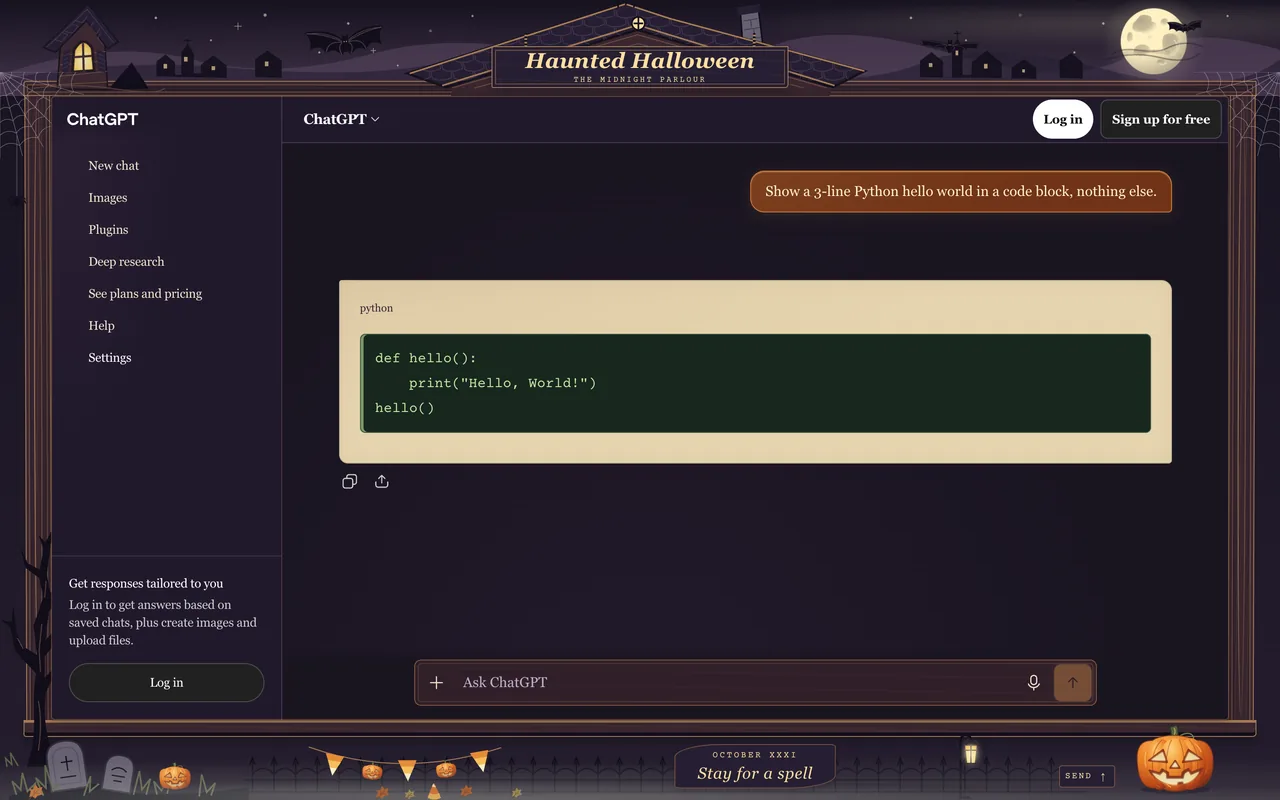
The Haunted Halloween look
Haunted Halloween turns your chat into the window of an illustrated haunted house. Bats cross a cratered moon, a candle lights the attic, and a gnarled tree stands beside a tiny graveyard. Every detail is original inline SVG artwork bundled with the theme.
Inside, serif text sits on aged parchment, your messages glow pumpkin orange, and code gets a cauldron-green panel with typewriter lettering. The hand-made light palette changes the scene to a foggy October afternoon. Only the look changes; your conversations and the site's own controls keep working.
- Crooked timber frame with individual roof shingles and shuttered attic window
- Membraned bat wings, delicate cobwebs and a softly glowing cratered moon
- Ribbed jack-o’-lantern that forwards clicks to the site's send button
- Parchment replies, pumpkin bubbles and green code panels
- Moonlit dark mode and a hand-made foggy afternoon light mode
- Original artwork and bundled Courier Prime; no remote images or fonts
What changes
- Base
- Dark
- Font
- Serif
- Code font
- Courier Prime typewriter
- Corners
- 8px radius
- Frame
- custom
- Effects
- None
- Palette
Nothing is hidden, moved or covered. Frames are decoration around the app and never sit over the input, menus or send button.
Haunted Halloween on ChatGPT, Claude and Gemini
One theme, every app. Pick it once and it follows you across chatgpt.com, claude.ai and gemini.google.com.
How to use the Haunted Halloween theme
- 1
Install ChatTheme
Add the free ChatTheme extension to Chrome, Edge, Brave or Arc from the Chrome Web Store.
- 2
Open ChatGPT, Claude or Gemini
Go to chatgpt.com, claude.ai or gemini.google.com and click the ChatTheme icon in the toolbar to open the side panel.
- 3
Pick Haunted Halloween
Click Haunted Halloween in the Themes tab. It applies instantly without reloading. Press Alt+Shift+T any time to switch back to the stock look.
Want a variation? Open the Create tab and type something like “Haunted Halloween but pink” or “add stickers”. AI edits the theme live and you can undo any step.