 Add to Chrome
Pink flip phone theme for ChatGPT, Claude and Gemini
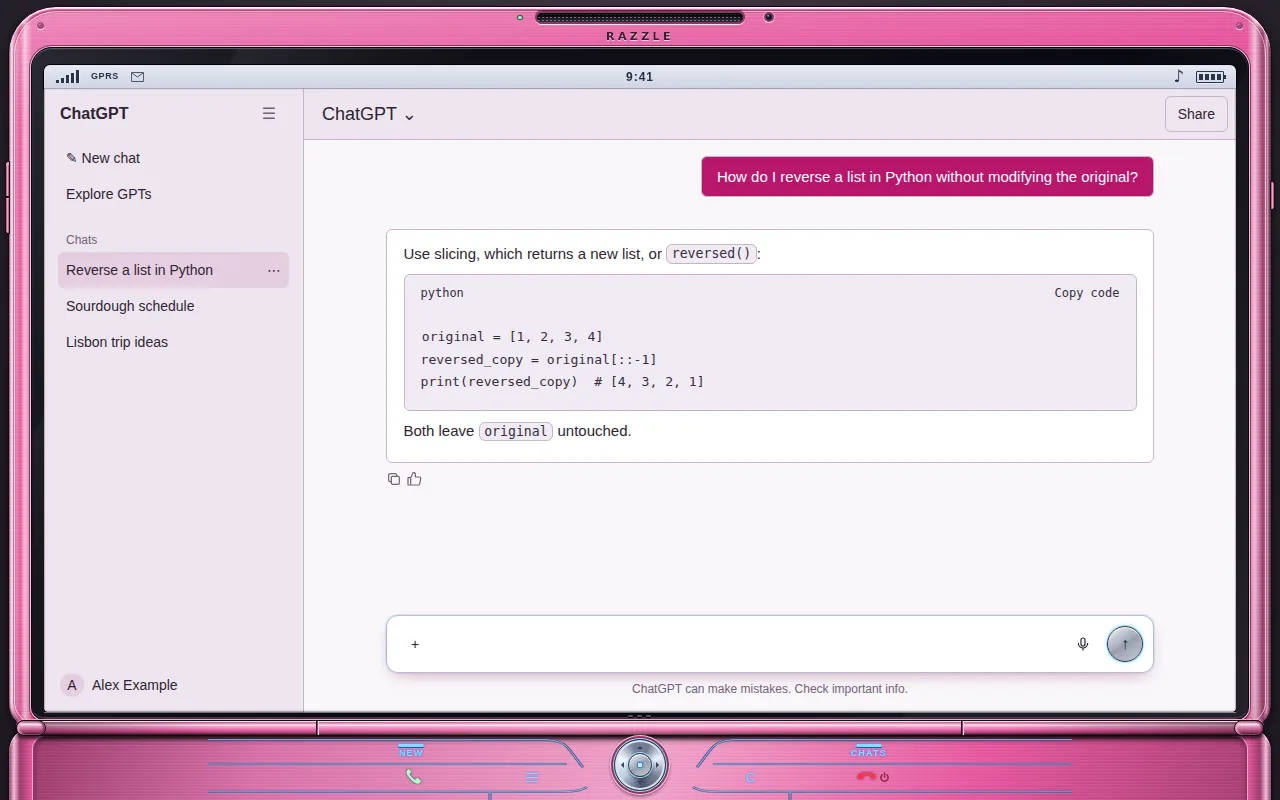
A hot-pink anodised clamshell, glossy screen and an etched keypad. Your chat lives on the top screen.
Free · chatgpt.com, claude.ai and gemini.google.com · Off in one key with Alt+Shift+T
The Flip Phone look, 2004–2006
In the mid-2000s the thin metal clamshell was the phone to have, and the pink one was the one everybody remembers. Flipping it open was half the point.
The Flip Phone theme frames ChatGPT, Claude and Gemini as that phone: the chat sits on the glossy top screen, the hinge and keypad are drawn around it, and the palette is pure Y2K pink. The keypad is decoration; your real input box and send button stay exactly where they are.
- Hot-pink metallic clamshell frame
- Glossy screen with status bar
- Etched keypad and hinge (decorative, never over the input)
- Soft pink message bubbles
What changes
- Base
- Light
- Font
- Tahoma
- Code font
- Monospace
- Corners
- 6px radius
- Frame
- flip phone
- Effects
- None
- Palette
Nothing is hidden, moved or covered. Frames are decoration around the app and never sit over the input, menus or send button.
Flip Phone on ChatGPT, Claude and Gemini
One theme, every app. Pick it once and it follows you across chatgpt.com, claude.ai and gemini.google.com.
How to use the Flip Phone theme
- 1
Install ChatTheme
Add the free ChatTheme extension to Chrome, Edge, Brave or Arc from the Chrome Web Store.
- 2
Open ChatGPT, Claude or Gemini
Go to chatgpt.com, claude.ai or gemini.google.com and click the ChatTheme icon in the toolbar to open the side panel.
- 3
Pick Flip Phone
Click Flip Phone in the Themes tab. It applies instantly without reloading. Press Alt+Shift+T any time to switch back to the stock look.
Want a variation? Open the Create tab and type something like “Flip Phone but pink” or “add stickers”. AI edits the theme live and you can undo any step.