 Add to Chrome
Windows 95 theme for ChatGPT, Claude and Gemini
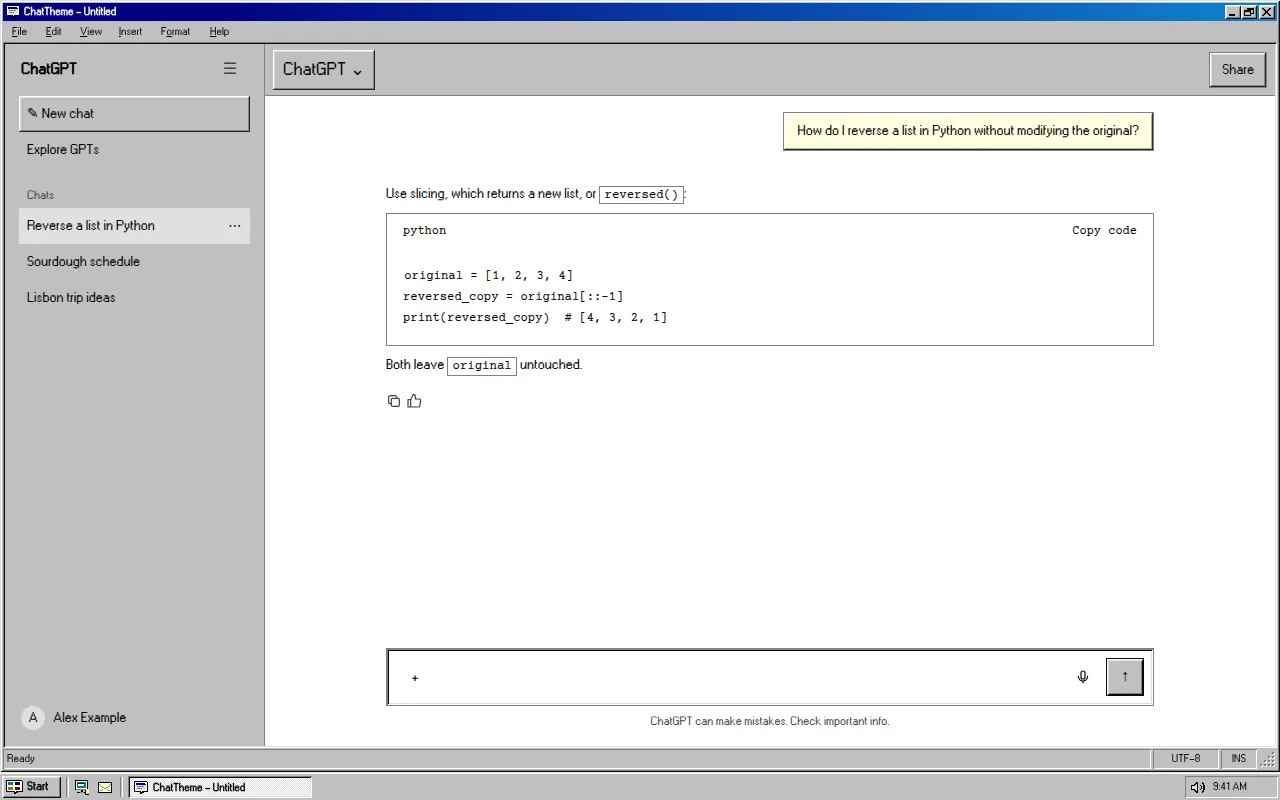
Silver 3D bevels, a navy title bar, a pixel sans-serif and a Start taskbar along the bottom. Your chat, maximised on a 1995 desktop.
Free · chatgpt.com, claude.ai and gemini.google.com · Off in one key with Alt+Shift+T
The Win95 look, 1995
Windows 95 shipped on August 24, 1995 and introduced the Start button and taskbar that every Windows desktop still has. Its look was built from a handful of greys: light edges on the top-left, dark edges on the bottom-right, so every button seemed raised off the screen.
The Win95 theme rebuilds that look around ChatGPT, Claude and Gemini. Messages sit in sunken white panels, buttons are raised, and the whole app lives in a maximised window. We took one liberty: the navy-to-blue title-bar gradient arrived with Windows 98, and it looked too good to leave out.
- #C0C0C0 silver surfaces with two-tone bevels
- Navy title bar with minimise, maximise and close glyphs
- Pixel UI font bundled with the extension (no remote fonts)
- Start-style taskbar along the bottom edge
- Square corners everywhere, like the original
What changes
- Base
- Light
- Font
- W95FA pixel sans
- Code font
- Courier Prime typewriter
- Corners
- Square
- Frame
- win95
- Effects
- None
- Palette
Nothing is hidden, moved or covered. Frames are decoration around the app and never sit over the input, menus or send button.
Win95 on ChatGPT, Claude and Gemini
One theme, every app. Pick it once and it follows you across chatgpt.com, claude.ai and gemini.google.com.
How to use the Win95 theme
- 1
Install ChatTheme
Add the free ChatTheme extension to Chrome, Edge, Brave or Arc from the Chrome Web Store.
- 2
Open ChatGPT, Claude or Gemini
Go to chatgpt.com, claude.ai or gemini.google.com and click the ChatTheme icon in the toolbar to open the side panel.
- 3
Pick Win95
Click Win95 in the Themes tab. It applies instantly without reloading. Press Alt+Shift+T any time to switch back to the stock look.
Want a variation? Open the Create tab and type something like “Win95 but pink” or “add stickers”. AI edits the theme live and you can undo any step.